
LinkedIn polls are a dynamic tool for thought leaders and marketers aiming to engage their audience, gather valuable insights, and enhance brand visibility. By posing targeted questions, we can foster meaningful interactions.
Polls can cover a broad range of inquiry
But what topics can simple polls cover? Here are a few to get you started
Collect feedback on products and services – Engaging customers directly through polls allows businesses to understand preferences and areas for improvement. For instance, “Which feature do you value most in our latest product?” with options highlighting different attributes. This approach not only gathers feedback but also demonstrates a commitment to customer satisfaction.
Gauge interest in upcoming offerings – Before launching new products or services, polls can assess potential customer interest. Questions like, “Would you be interested in a subscription-based model for our service?” help determine market readiness and guide development efforts.
Drive conversations on industry topics – Polls can spark discussions on relevant industry issues, positioning your brand as a thought leader. For example, asking, “What do you think is the biggest challenge in our industry today?” encourages engagement and showcases your brand’s involvement in current conversations.
Identify audience pain points – Understanding the challenges your audience faces enables tailored solutions. A poll such as, “What is your biggest hurdle in adopting new technology?” provides insights that can inform product development and marketing messages.
Address knowledge gaps – Polls can reveal areas where your audience seeks more information, guiding content creation. Inquiring, “Which topic would you like us to cover in our next webinar?” ensures your content aligns with audience interests and needs.
Enhance brand awareness – Engaging polls increase visibility as participants’ networks see their interactions, expanding your reach. Creative questions related to your industry can attract attention and foster brand recognition.
Support lead generation – By addressing topics that resonate with your target market, polls can attract potential leads. Following up with participants who showed interest in specific areas can nurture these leads into customers.
Creating effective LinkedIn polls
If you are new to polls, here are a few suggestions:
- Keep questions clear and concise: Ensure your poll question is straightforward to encourage participation.
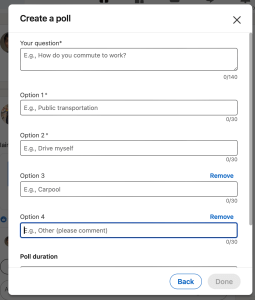
- Limit response options: Offering 3-4 options prevents overwhelming respondents and simplifies decision-making. LInkedIn allows a max of 4 options.
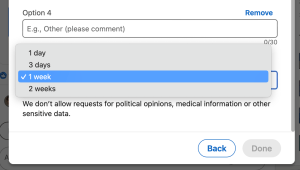
- Set an Appropriate Duration: A poll duration of 3-7 days balances urgency with ample response time.
- Engage with respondents: Monitor poll results and interact with participants to foster community engagement.
- Analyze results: Use poll outcomes to inform marketing strategies and address identified audience needs.
- Maintain relevance: Align poll topics with your brand and audience interests to ensure meaningful engagement.
- Avoid overuse: Space out polls to maintain their impact and prevent audience fatigue.
- Promote Polls Across Channels: Share your LinkedIn polls on other platforms to increase participation.
- Use visuals when appropriate: Incorporate images or videos to make polls more engaging and eye-catching.
- Be transparent about intent: Clearly state the purpose of the poll to build trust with your audience.
- Follow up on poll results: Share insights gained from the poll and any actions your company plans to take, demonstrating responsiveness.
- Comply with LinkedIn guidelines: Ensure your polls adhere to LinkedIn’s policies to maintain credibility and avoid issues.
How to create a poll
Start with your normal post dialog box

Choose the poll option

Enter your question and up to four options
Set duration – max is 2 weeks
Publish – that’s all there is to it.